Understanding Processor Generations: A Complete Guide
What Are Processor Generations?
Processor generations represent distinct architectural iterations of a central processing unit (CPU) from a manufacturer, typically Intel or AMD. Each generation introduces improvements in manufacturing process, microarchitecture, power efficiency, instruction sets, and integrated features over its predecessor. Understanding these generations is critical for informed purchasing decisions, as generational leaps often yield significantly better performance, thermal management, and compatibility with modern software. A generation is denoted by a number (e.g., Intel Core i7-13700K is 13th Gen) or a series name (e.g., AMD Ryzen 7000 Series). The underlying technology—measured in nanometers (nm) for transistor size—shrinks with each generation, typically reducing power draw and heat while enabling higher clock speeds.
The Core Metrics That Define Generations
Manufacturing Process Node – Measured in nanometers (nm), this indicates the average half-pitch between identical features in the chip. Smaller nodes (e.g., 7nm vs. 14nm) allow more transistors per square millimeter, boosting performance and efficiency. Intel’s 12th Gen (Alder Lake) uses Intel 7 (formerly 10nm Enhanced SuperFin), while AMD’s Ryzen 7000 uses TSMC’s 5nm node. Each node shrink typically delivers 20-30% better performance-per-watt.
Microarchitecture – This is the internal design of the CPU cores, including cache hierarchy, execution units, branch prediction, and pipeline depth. Microarchitecture names like Intel’s “Raptor Cove” (13th Gen) or AMD’s “Zen 4” (Ryzen 7000) define how instructions are processed. A new microarchitecture can improve Instructions Per Cycle (IPC) by 10-20% over its predecessor, even at identical clock speeds.
Socket and Chipset Compatibility – Each generation typically requires a new motherboard socket and chipset to support changes in memory controllers, PCIe lanes, and power delivery. For instance, Intel’s 12th and 13th Gen use LGA1700, while AMD’s AM5 socket debuted with Ryzen 7000. Reusing older motherboards with newer CPUs is only possible if the socket and BIOS updates are supported.
Intel Processor Generations: A Historical Breakdown
Intel’s naming convention uses “Gen” after the brand modifier. The current mainstream Core series spans from 1st Gen (2010) to 14th Gen (2023). Key generational milestones:
6th Gen (Skylake, 2015) – Introduced LGA1151 socket, DDR4 memory support, and a 14nm process. IPC gains were ~10% over Broadwell. Still used in many budget PCs.
8th Gen (Coffee Lake, 2017) – Jumped from 4 to 6 cores in mainstream i7s, a seismic shift for multitasking. Required a new 300-series chipset despite same socket.
12th Gen (Alder Lake, 2021) – Hybrid architecture combining high-performance “P-cores” (Golden Cove) with efficient “E-cores” (Gracemont) on Intel 7 (10nm). Supported DDR5 and PCIe 5.0. Thread Director technology intelligently scheduled tasks.
13th Gen (Raptor Lake, 2022) – Increased E-core count (up to 16 on i9), improved clock speeds via enhanced Intel 7 process, and larger L2 cache. Boosted single-thread performance by 15%.
14th Gen (Raptor Lake Refresh, 2023) – Minor IPC uplift (3-5%) but higher stock frequencies and support for Wi-Fi 7. Primarily a refinement, not a new architecture.
AMD Processor Generations: A Historical Breakdown
AMD’s Ryzen generations are numbered differently (Ryzen 1000, 2000, 3000, 5000, 7000). Key milestones:
Ryzen 1000 (Summit Ridge, 2017) – Zen 1 microarchitecture on 14nm. 8 cores/16 threads at a competitive price point. Introduced AM4 socket.
Ryzen 3000 (Matisse, 2019) – Zen 2 on 7nm chiplet design. Up to 16 cores. IPC improved 15% over Zen+. First mainstream consumer CPU to beat Intel in multi-threaded workloads.
Ryzen 5000 (Vermeer, 2020) – Zen 3 on 7nm, unified L3 cache (CCX redesign). IPC gain of 19%, reclaiming single-thread leadership. No socket change (AM4).
Ryzen 7000 (Raphael, 2022) – Zen 4 on TSMC 5nm, new AM5 socket, mandatory DDR5 and PCIe 5.0 support. Integrated RDNA 2 graphics. Clock speeds exceeded 5.7 GHz out of the box.
Ryzen 8000 (Phoenix, 2024) – Focus on integrated AI engines (NPU) for on-device machine learning. Hybrid architectures begin to appear with Zen 4c cores.
How to Identify Processor Generations by Model Number
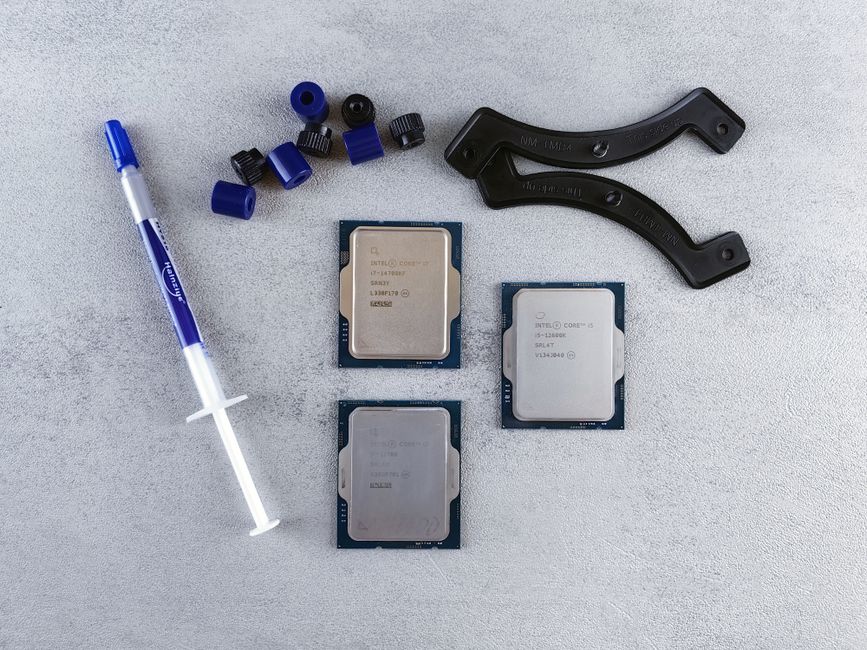
For Intel, the generation is the first digit (or first two digits) of the four-digit SKU number following the brand modifier. Example: Intel Core i7-13700K – The “13” indicates 13th Gen. An i5-12600K is 12th Gen. For laptops, model numbers like i7-1355U also use the same logic.
For AMD Ryzen, the generation is indicated by the first digit(s) of the model number after the series prefix. Ryzen 7 7800X3D – The “7” means 7000 series (Zen 4). Ryzen 5 5600X – “5” indicates 5000 series (Zen 3). However, be cautious: Ryzen 4000 (Renoir) was a mobile-first generation, while Ryzen 4000G (desktop APUs) used Zen 2, not Zen 3. Always cross-reference with architecture names.
Performance Implications: Why Generational Upgrades Matter
A one-generation upgrade typically yields 10-15% single-thread improvement and 15-25% multi-thread improvement at the same core count. A two-generation leap—e.g., from Intel 10th Gen (Comet Lake) to 12th Gen—can deliver 40-50% better multi-threaded performance due to hybrid architecture and DDR5.
However, generational upgrades also affect power efficiency. The same performance often consumes 30-50% less power on newer nodes. For example, an Intel 13th Gen i9-13900K at 65W matches an 11th Gen i9-11900K at full 125W TDP in multi-threaded tasks.
Integrated graphics also advance. Intel’s Iris Xe (11th-12th Gen) and Xe-LP in 13th Gen offer 2x performance over UHD Graphics 630. AMD’s Ryzen 7000 includes RDNA 2 iGPUs, enabling 1080p light gaming without a discrete GPU.
Compatibility Traps: What Changes Each Generation
Socket Lifecycle – Intel changes sockets roughly every two generations. LGA1151 survived from 6th to 9th Gen but required different chipsets (100, 200, 300 series). AMD’s AM4 lasted five generations (Ryzen 1000 through 5000), but AM5 is expected for at least 2022-2026.
Memory Support – A new generation often mandates new memory standards. Ryzen 7000 requires DDR5, not DDR4. Intel 12th/13th Gen supports both DDR4 and DDR5 on specific motherboards, but 14th Gen LGA1700 boards are DDR5-only for maximum performance.
Chipset Features – New chipsets add PCIe 5.0 lanes (B660, Z790 for Intel; B650, X670 for AMD), faster USB (USB 3.2 Gen 2×2), and more M.2 NVMe slots. Older chipsets may limit storage or GPU bandwidth.
Power Delivery – High-core-count CPUs (e.g., 13th Gen i9-13900K pulling 250W) require robust VRM designs on motherboards. A budget H610 board may throttle a top-tier generation CPU.
Determining Whether to Upgrade Generations
For gaming, a two-generation gap is typically the threshold for noticeable gains. An RTX 4090 paired with an Intel 10th Gen may bottleneck at 1080p high refresh rates due to lower IPC. Upgrading to 13th Gen can provide 20-30% more FPS in CPU-bound titles.
For productivity (video editing, 3D rendering, software compilation), core count and cache size matter most. Moving from a 6-core CPU to a 12-core/16-thread newer generation halves render times. However, a one-generation upgrade (e.g., Ryzen 5000 to 7000) may be less compelling if your workload is GPU-accelerated.
For budget builds, last-generation CPUs (e.g., Ryzen 5000 or Intel 12th Gen) offer excellent value, often at 40-50% discount to current gen, with only 10-15% less performance. Pair them with a DDR4 motherboard for further savings.
Emerging Trends: AI, Hybrid Architectures, and Chiplet Evolution
Hybrid Architecture – Intel’s P-core/E-core design is now standard. AMD will adopt similar hybrid designs with Zen 5 (Ryzen 9000 series), using Zen 5c for efficiency. This requires software-aware scheduling (Windows 11 required for optimal results).
Neural Processing Units (NPUs) – Starting with Intel Meteor Lake (14th Gen mobile) and AMD Ryzen 8000, on-die AI accelerators handle real-time tasks like background blur, voice enhancement, and AI video upscaling without taxing the CPU cores. Expect NPUs to become mandatory for AI workloads by 2025.
Chiplet and Tile Design – AMD’s chiplet approach separates CPU cores, I/O, and graphics onto different dies, improving yields. Intel’s Foveros technology (used in Meteor Lake) stacks tiles vertically for similar benefits. This allows mixing different process nodes (e.g., compute tile on 3nm, I/O on 12nm) in a single package.
Overclocking Potential – Newer generations often have tighter voltage controls and better thermal interfaces (e.g., Intel’s thermal velocity boost). However, silicon quality varies widely. AMD’s Ryzen 7000 series introduced precision boost overdrive 2 for automated undervolting.